Runtime Behavior
Logging
By default, yeetr.run installs a Rich-based logging handler before
invoking your function, so you get formatted logs with zero boilerplate:
import logging

import yeetr

logger = logging.getLogger("app")


def main(thing: int) -> None:
    logger.info("thing = %s", thing)
If your function has a log_level parameter (e.g.
log_level: Literal["debug", "info", "warning", "error"] = "info"), its
value drives the log level. Otherwise, the default is INFO.
Setup is idempotent: if the root logger already has handlers, yeetr does not touch them. To take full control of logging yourself, opt out:
Testing
run() accepts an explicit argv for tests:
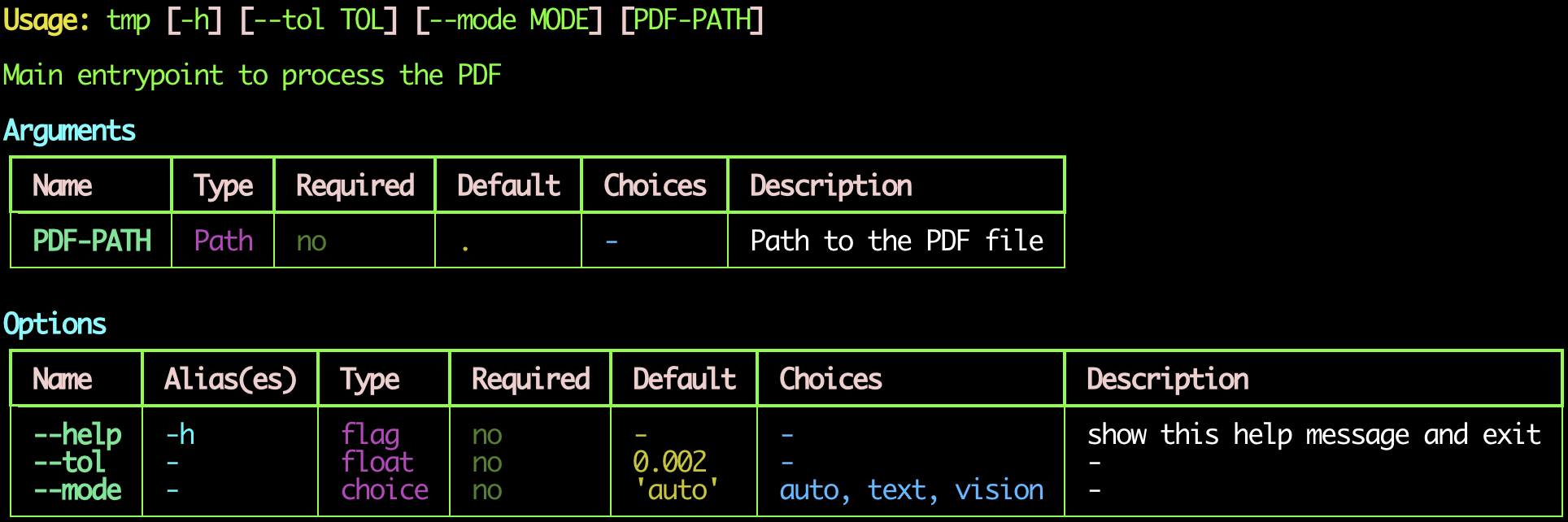
Help And Error Messages
On --help or a CLI parse error, yeetr renders the target function's
arguments and options in the same readable Rich table layout.
For example, this script:
#!yeet
from logging import getLogger
from pathlib import Path
from typing import Annotated, Literal

from yeetr import Arg

logger = getLogger("Tmp")

type PDFPathArg = Annotated[Path, Arg(help="Path to the PDF file")]


def main(
    pdf_path: PDFPathArg = Path("./"),
    *,
    tol: float = 0.002,
    mode: Literal["auto", "text", "vision"] = "auto",
) -> None:
    """Main entrypoint to process the PDF"""
    logger.info(f"Processing PDF at: {pdf_path}, tol: {tol}, mode: {mode}")
produces help like this: